



cTrader vs MT5 vs TradeLocker for Prop Trading: Which One Fits You?
You’re at checkout. You’ve picked your challenge, and there’s one more choice to make: which platform? The cTrader vs MT5 and cTrader vs MT5 questions appear in most prop trading chats.
But here’s the simple answer. MT5 is a great choice for traders who run robots and prefer classic tools. cTrader is a fit for traders looking for deep charts and a clutter-free order screen. TradeLocker is a go-to for those who want to see TradingView charts in a straightforward application.
There’s no one-size-fits-all platform. The right fit depends on how you trade, where you reside, and what screen you use in your day-to-day life. мм
We’ll use OneFunded as our example, as it offers all three platforms on desktop, web, Android, and iOS. Two things are worth knowing before you choose. Your challenge rules come from the plan you buy, not the platform you pick, though commission and the leverage on stocks are exceptions we’ll come back to. And the platform is tied to that challenge account from the moment you check out, so it isn’t a decision you can undo halfway through.
You can think of these three platforms as three bikes. They all get you from point A to point B. However, how they ride is a little bit different.
| Feature | MT5 | cTrader | TradeLocker |
| Made By | MetaQuotes | Spotware | TradeLocker |
| Charts | Own charts | Own charts alongside tick, Renko, range, and Heikin Ashi | TradingView charts |
| Timeframes | 21 | 26 standard, plus tick, Renko, range and Heikin Ashi variants | TradingView set |
| Built-in Tools | 38 indicators, 46 analytical objects | 60+ indicators | TradingView built-ins |
| Pending Order Types | 3 types (Limit, Stop, Stop-Limit) each as a buy or a sell | 3 types (Limit, Stop, Stop-Limit) each as a buy or a sell | 2 types (Limit, Stop) each as a buy or a sell |
| Risk Sizing | Manual math or script add-on | Built-in risk calculator | Built-in risk calculator |
| Commission (per lot) | $4 forex, $3 metals, $0 shares and crypto | $3.50 forex, $0.25 indices, $7 metals | $4 forex, $3 metals, $5 shares |
| Automation | EAs in MQL5, Strategy Tester | cBots in C# or Python, cloud runs | TradeLocker Studio, no-code AI bots |
| Depth of Market | Yes, on desktop and mobile | Yes, in three views: Standard, Price, and VWAP | Not documented |
| One-Click Trading | Yes, from the Depth of Market or the chart | Yes, via Quick Trade mode | Yes, but must be activated in settings |
| Mobile App | iOS and Android | iOS and Android | iOS and Android, also available via Huawei AppGallery |
| Feel | Traditional looks, many menus | Modern, with detachable charts | Clean, app-style |
| Learning Curve | Medium to hard | Medium | Easy |
| At OneFunded | Not available for users in the USA or Turkey | Not available for users in the USA | Open to everybody in an unrestricted country |
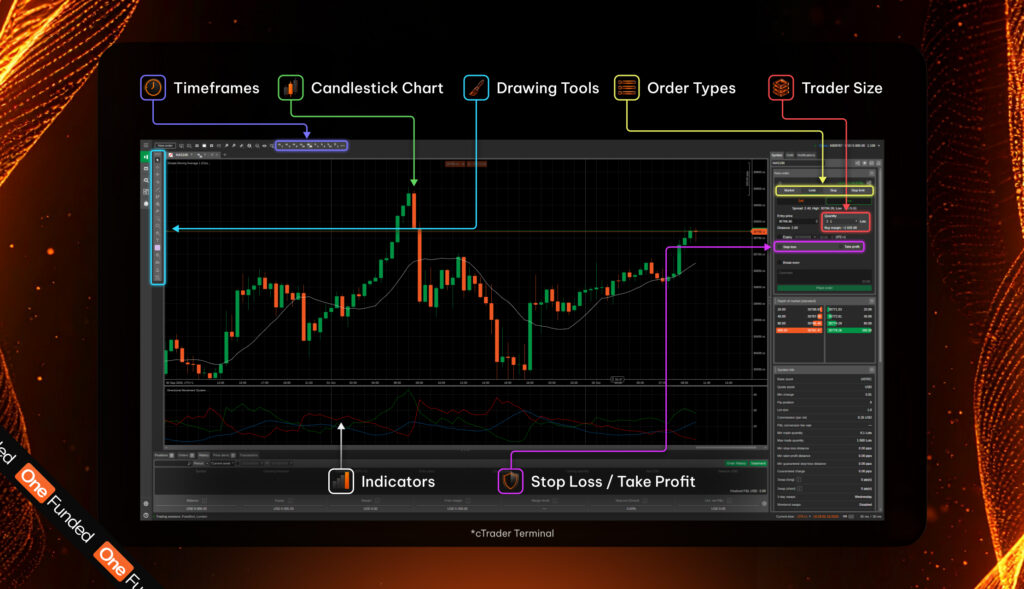
The platform is the steering wheel. The engine behind it is somewhere else entirely. Fills, slippage, and execution all come from the prop firm and not the platform. So, if you’d like to compare execution, you must do so based on how each screen posts and shows your orders.
If you use MT5, you’ll find two types of market order, three pending order types (each one has a buy and sell), two stop orders in Stop Loss and Take Profit, and a trailing stop. The Buy Stop Limit and Sell Stop Limit orders help breakout traders. Once the price gets to your trigger, MT5 places a limit order at the level you set, so you fill at that price or better.
cTrader offers the same three pending order types: Limit, Stop, and Stop-Limit. What sets it apart is what happens after you click. Every order carries full order and deal information with a chronological event log, from submission through to the matched fill, and its risk-reward tool shows your lot size on the chart once you place a stop.
On TradeLocker, the order box is home to the risk calculator. You can set your stop loss and take profit in dollars, in ticks, as a percentage of your balance, or by price. And after that, you can drag both of them on the chart.
Why is this important for a prop account? Let’s say you trade on a $100,000 Core account. The daily loss limit on this evaluation is set at 5%. This means the maximum allowed loss each day is $5,000. If you’ve got plans to risk 0.5% of your account size for every trade, that’s $500.
On TradeLocker or cTrader, you’d see your dollar risk before you make a trade. On MT5, you do the math yourself or use an approved tool. And getting the math wrong on a busy morning can result in breaches that cost you the entire challenge.
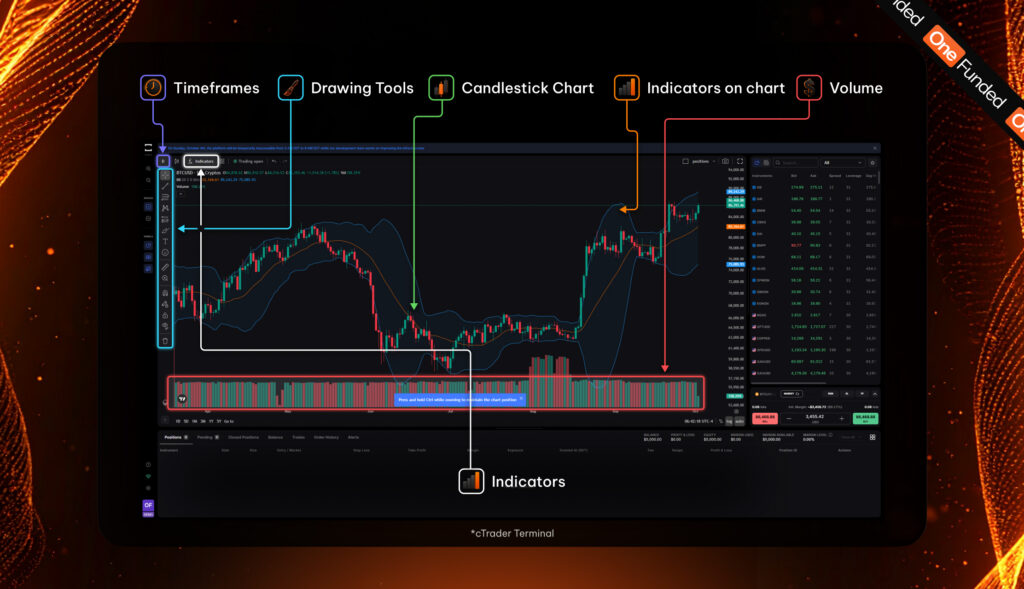
Think of charts as your map. A great map shows you the roads important to you and hides anything that’s not useful.
The MT5 desktop app has 21 timeframes, 38 indicators, and 46 analytical objects. There are also custom indicators you can add from its huge library. But these numbers get trimmed down on the web version. Here, you’d find 9 timeframes, 30 indicators, and 24 objects, and the official feature list for the web terminal doesn’t include custom indicators or Expert Advisors.
If you intend to trade MT5 in a browser, it’s vital you test it first. Some MT5 traders keep TradingView open as a second screen for analysis. While this sounds great, it adds one more place to make an error.
On cTrader, you’d get 26 standard timeframes and more than 60 built-in indicators. It also offers Renko, range, and Heikin Ashi charts, plus tick-based bars, which are great for traders looking to filter out the noise.
What’s more? You can pull charts out into their own windows, great for a desk with two to three screens. cTrader also has Market Replay that lets you practice with old price data without touching your challenge’s limits.
TradeLocker uses TradingView charts. If you mark up levels on TradingView, you’d feel at home right from your first day. However, TradeLocker doesn’t let users load TradingView community scripts into its Studio. So, make sure it has your preferred custom indicator before you commit to it.
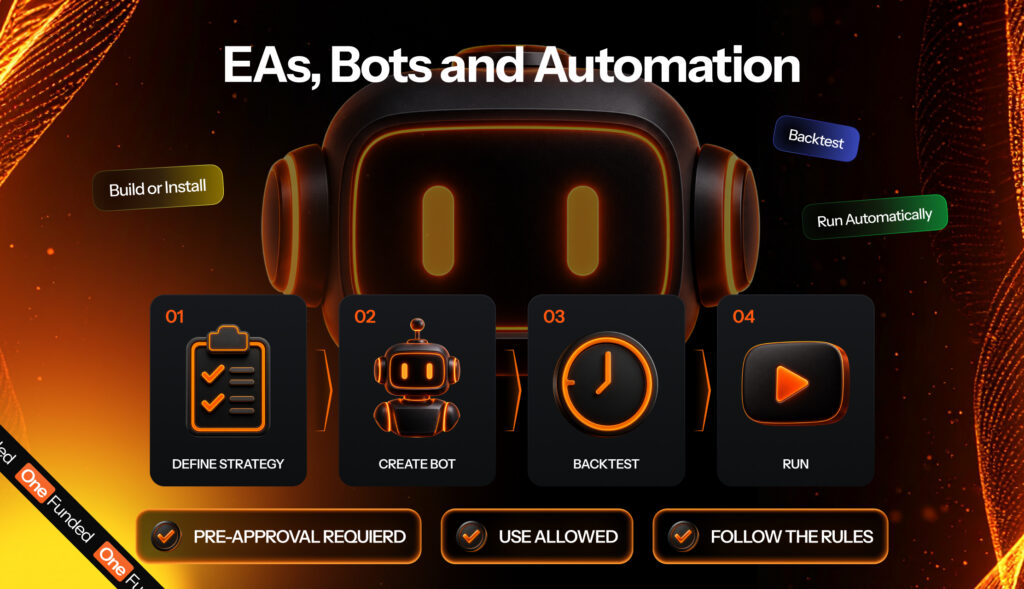
MT5 runs Expert Advisors (EAs) written in MQL5. It’s got a huge market of already-made EAs. There’s also a Strategy Tester useful for backtests. Own an EA already? It’ll fit snugly into MT5.
cTrader runs cBots written in Python or C#. Since the release of version 5.0, cBots function on cTrader’s cloud, giving your laptop the breathing space it needs. But there’s a trade-off. The cBot community is smaller than the EA crowd, meaning fewer ready-made tools.
TradeLocker Studio lets you describe the strategy you want to use in regular words. After you’ve done that, its AI will turn those words into a bot that you can backtest. Studio runs on the desktop app only, not on web or mobile. It’s also a great fit for curious traders, not coders. If you’ve never written code, you can use this Studio to turn worded rules into real-world trades.
OneFunded allows the use of EAs. But this only happens if the prop firm pre-approves its use. To get approval, submit the name of the EA, a link to it, and how it works to support. This lets them know whether it’s a trading assistant or a tool that makes trading choices for you. Using EAs without prior approval can result in account termination.
Debates around TradeLocker vs MT5 usually boil down to comfort. MT5 launched in 2010. It has many add-ons, but to find what you need, you must go through different menus. On the other hand, TradeLocker feels like a smartphone app. Buttons sit in spots your thumb can reach. cTrader sits in the middle: it’s modern, but has deep menus like MT5.
OneFunded has these trading platforms running on desktop, web, iOS, and Android. But where you reside matters. If you’re in Turkey or the USA, you can’t use MT5. OneFunded also doesn’t allow US traders to use cTrader. Those in the US can only use TradeLocker. If you live in other unrestricted countries, you can make your pick from the three.
These platforms have their bad days. Plan for problems on all of them. You can do this by keeping the platform’s phone app logged in. So, if your laptop freezes, you can still close trades. Always take screenshots when something goes wrong. This lets you present a clear record when support wants to review your case.
Newbies can place trades on TradeLocker within an hour of using it. You’d need to commit one or two days to learn cTrader. MT5 can take up to a week to feel natural. But using that week to learn its intricacies is vital if you’ve got automation plans.
The platform you pick matters less than what you do with it in real trading situations. Here are habits that work on all three platforms:
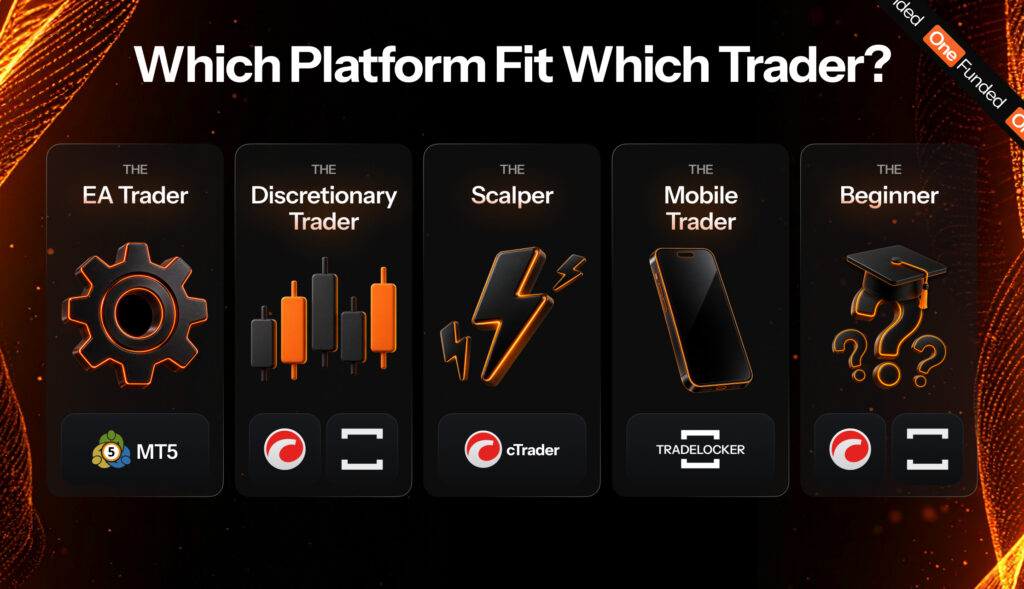
Traders use platforms that suit their needs. Here are some trader types and what platform(s) fit them the most:
Ingrid owns an MT5 EA that trades gold twice each week. Replicating this in C# can take months. As such, she goes with MT5, and she can, since she doesn’t reside in the USA or Turkey.
But her first step isn’t the trading platform. If she intends to trade at OneFunded, she must submit her EA’s name, link, and inner workings for approval.
Once she gets her EA approved, she doesn’t use it on live trades yet. Instead, she runs the EA on a demo account for the first two weeks. That way, she can make sure each losing day falls under her account’s daily loss limit.
Bob reads price action on EUR/USD and holds his trades for several hours. He also uses TradingView to draw his levels.
TradeLocker makes sense for him as it allows him to trade on a similar kind of chart, and its risk calculator automatically enters a correct lot size based on his stop-loss and risk tolerance.
If he’s not in the US, he can also use cTrader. Going this route allows him to get detachable charts on two different screens. Since Bob trades by hand, he doesn’t need a robot at all and doesn’t worry about the automation ability of each platform.
Nathaniel trades NAS100 on the 1-minute chart and takes about 15 trades daily. This style demands tick charts, Depth of Market, and a full record of every fill.
cTrader ticks all his boxes as long as he doesn’t live in the United States. Commission is the other reason. On indices, cTrader charges $0.25 a lot, where MT5 and TradeLocker charge $4, and at fifteen trades a day that difference compounds fast. Because screen speed is so important to him, he demo-tests each platform during the London open before buying a challenge.
Nathaniel also notes OneFunded’s news rules, as the prop firm monitors trades 5 minutes before and 5 minutes after a high-impact news report. He does this because breaking news can cause swift changes in the market that can bypass all risk setups.
Joanna has a day job at the local mall and can only whip out her phone and check the market during her 15-minute lunch break. She doesn’t have the time to go through multiple menus to find a tool she needs immediately.
The TradeLocker app fits her needs. MT5’s mobile version works too but can look cluttered on small screens. With the clock ticking, Joanna sets a stop and target within seconds on trades she’s got running. That way, she doesn’t breach rules during a staff meeting.
Harry has heard about trading for a while. After his last paycheck, he buys a $5,000 Value challenge on OneFunded for $29 to learn. Since he’s new to this world, he needs a platform with fewer menus and a clear dollar risk on every trade he wants to take.
TradeLocker ticks both boxes. But once he’s gotten better at trading, he can try out cTrader on a demo to see if the extra depth can help his budding trading career.
All of OneFunded’s challenges (including Value) have no deadline. So, he can take as much time as he needs to master a platform without feeling pressed for time.
Spreads at OneFunded are raw. We add no markup, so the gap between the buy and the sell price is the gap on the market, and it is the same on all three platforms.
The instrument list is the same too. Whichever platform you pick, you get the full catalogue: over 250 instruments across forex, indices, metals, energies, crypto, and US and European shares. The full list is in our help centre.
Commission is the exception. It is charged per lot, as each platform defines a lot for that asset class, and it changes with the platform you pick.
| Asset class | MT5 | cTrader | TradeLocker |
| Forex | $4 | $3.50 | $4 |
| Indices | $4 | $0.25 | $4 |
| Metals | $3 | $7 | $3 |
| Energies / oil | $4 | $3.50 | $3 |
| Commodities | $4 | $3.50 | $4 |
| Crypto | $0 | $0 | $0 |
| US shares | $0 | $0.02 | $5 |
| EU shares | $0 | $0.02 | $5 |
Indices are where cTrader wins outright. $0.25 a lot against $4 on MT5 and TradeLocker. If you trade indices often, this is the line in the article most likely to show up in your equity curve by the end of a challenge.
Metals run the other way. cTrader charges $7 a lot where MT5 and TradeLocker charge $3. Trade gold and nothing else, and cTrader is the most expensive of the three by more than double.
Shares favour MT5 and cTrader, not TradeLocker. MT5 charges nothing on US or EU shares and cTrader is close to nothing, while TradeLocker charges $5. Add leverage to that picture: US shares run at 1:100 on cTrader against 1:2 on the other two, so cTrader gives you the larger position and the smaller ticket at the same time.
Crypto costs nothing to trade on any of the three. Full leverage rates by asset class are in our help centre.
A platform doesn’t define metrics such as profit target, drawdown, or payout. Your plan determines them. The two exceptions are commission and the leverage available on stocks, both covered above. Here’s a table highlighting the numbers you’d come across based on your plan:
| Metric | Flash | Core | Value | Instant |
| Profit Target | 10% | 8% (Phase 1) | 5% (Phase 2) | 8% (Phase 1) | 6% (Phase 2) | None |
| Daily Loss | 4% | 5% | 4% | 3% |
| Overall Loss | 6% | 10% | 8% | 6% |
| Consistency | 50% | None | None | 15% |
| Min trading days | 1 day | 3 days | 4 days | None |
So, what can your platform do? It can help you stick to the rules highlighted in the table above. It shows your risk in dollars. Furthermore, it helps you to set stops quickly. And when high-impact news hits, your platform can help you stay afloat.
Want to know more about the metrics your chosen platform can help you with? Our guide on understanding prop firm rules explains how drawdown, targets, and consistency work, including how Instant differs from the three evaluation plans. If you’d like to compare prop firms, this article on how to choose a prop firm in 2026 will point you in the right direction.


Join our mailing list today!
If you’ve ever looked for prop firm challenges, you have probably seen two options: 1-step vs 2-step prop firm challenges....

Every prop firm challenge has a unique set of rules. This includes profit targets, drawdown limits, and consistency demands. Most...

You’ve made up your mind; you want to go into trading full-time in 2026. Great. But there are tens of...
 Set Preferred on Google